Skin can turn crunchy, foliage can smear, and new detail can appear that the camera never caught even when a file is big enough for 4K or 8K. PetaPixel’s July 8, 2026 roundup covered six image upscalers, but the key question is no longer whether a photo can be enlarged; it is whether the result still feels like the original frame.
Where upscaling actually earns its keep
Upscaling matters when the image has to do a job the original file was not built for. The common cases are straightforward: an older file needs to hold up in a print, a tight crop from a long lens shot needs more room on the page, a low-resolution scan needs rescuing, or a client wants delivery larger than the source allows. In each case, the goal is not just more pixels. It is keeping the photograph believable once it is examined at size.
That is why the strongest upscaling decisions start with the final use, not the software. A file meant for a large print can tolerate different treatment than one destined for heavy cropping or archival restoration. If the image will be inspected closely, any fake-looking texture, overworked edge, or waxy patch in skin becomes obvious very quickly.
What “natural” really means
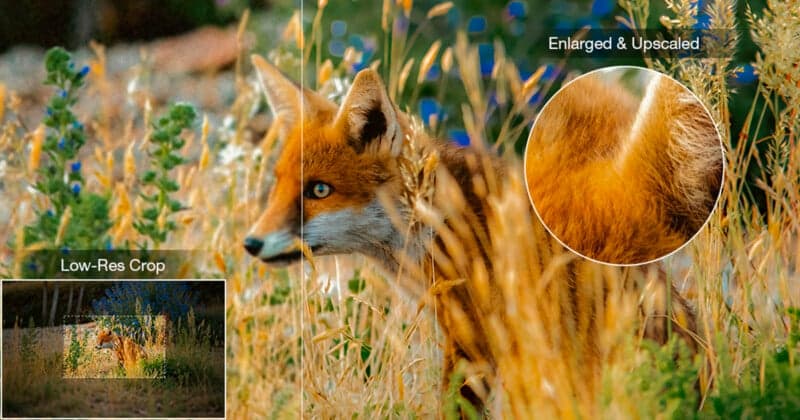
The natural look is mostly about restraint. Some tools sharpen too aggressively, and that can make skin, hair, foliage, and fine texture look crunchy instead of detailed. Others go further and invent detail that was never there, which can help in moderation but can also push the file into that artificial, plastic look photographers immediately notice.
The best enlargements preserve the character of the photograph, including its tonal transitions and micro-contrast. Those are the small visual cues that keep an image from looking like a generic AI reconstruction.
A useful way to judge any result is to look at the parts of an image that usually give up first:
- skin and hair, where over-sharpening shows fast
- foliage and texture, where AI can turn detail crunchy
- edges and fine patterns, where the image starts to look manufactured
- tonal gradients, where the file can lose the smooth transitions that make it feel real
How Adobe positioned Super Resolution
Adobe has treated upscaling as a practical camera workflow, not a novelty. It introduced Super Resolution in Camera Raw in March 2021 and later made it available in Lightroom and Lightroom Classic as an AI feature that increases resolution 4X. In Adobe’s own example, a 10-megapixel photo becomes a 40-megapixel file, which is exactly the kind of jump that matters when a small original has to become a usable print.
Adobe has consistently tied Super Resolution to old low-resolution photos and large prints. Adobe’s Lightroom help page, last updated June 18, 2026, now also includes Generative Upscale and AI Sharpen, showing how quickly the company’s enhancement tools have moved beyond simple enlargement.
How Topaz positioned Gigapixel
Topaz Labs has taken the same problem and built a tool around it. Gigapixel AI launched in 2019, and Topaz says it was the first commercially available AI image upscaler. The software is positioned for printing, cropping, restoration, scanned photographs, and compressed images. Gigapixel can run as a standalone app or as a plugin inside editing software, which gives it flexibility in a working photographer’s workflow.
A scanned print needs one kind of treatment, a compressed JPEG needs another, and a crop from a long lens frame may need something that preserves subject detail without flattening the rest of the image.
Choosing the right level of AI help
The best upscaling choice is usually the one that matches the job with the least visible intervention. Speed matters when a delivery is due, but so does texture fidelity when the image will be printed large or scrutinized close up. File clean-up is useful for scans and compressed originals, while the least aggressive result is often the best answer when the goal is simply to make a believable print.
The debate is no longer whether AI can enlarge a photo at all, because Adobe’s 4X Super Resolution and Topaz’s 2019-era Gigapixel both proved that it can.
Every story on Photography News is assembled by an automated editorial system that works from verified research, official records, and credible reporting, then clears automated accuracy and moderation checks before it goes live. The standards that system follows are set and overseen by the people who run the publication. Read our full editorial policy.
Did this article answer your question?